


Temple Square
4.811.00 Reviews
App Specs
- Version
- 1.0.9
- Updated On
- License
- Free
- Downloads
- 10,000+
- Developer
- The Church of Jesus Christ of Latter-day Saints
- Categories
- Travel & Local
- Platform
- Android
Screenshots
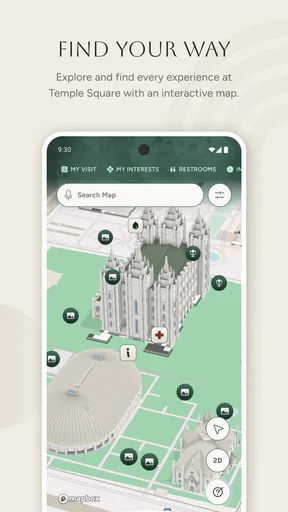
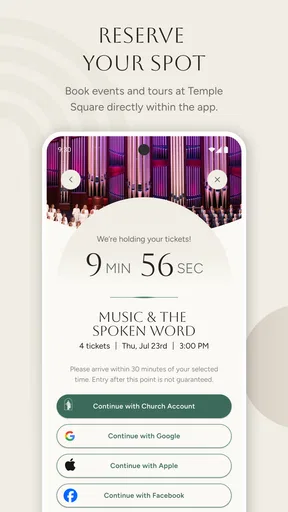
 Analysis by AppCompare
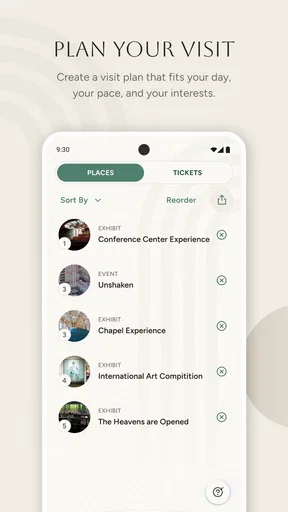
Planning a visit to Temple Square can involve more than deciding when to arrive. One person may want a tour, another may care about the grounds and history, while someone else simply needs a clear plan for keeping the day relaxed. I found Temple Square most useful as a focused visitor companion rather than a general travel planner. It gives the destination its own space, which makes it easier to prepare for a visit without sorting through unrelated city information.
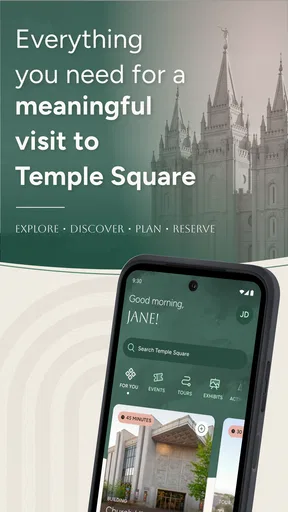
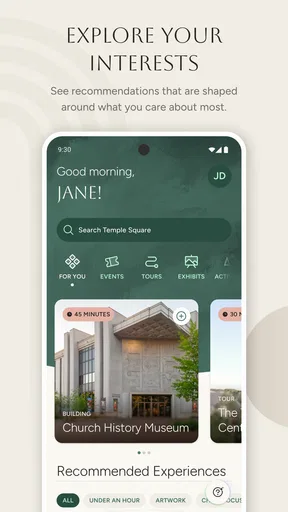
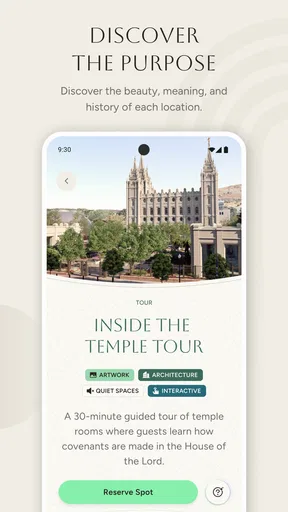
This is a free Travel & Local app from The Church of Jesus Christ of Latter-day Saints. Its purpose is straightforward: help visitors plan, take part in tours, and explore Temple Square. That narrow focus is also its biggest strength. Instead of trying to replace a complete city guide, it concentrates on the experience of one well-known location.
How it works for a shared visit
I can imagine using it on a shared phone before a household trip. One person could look through the visit information while another decides which tour sounds suitable. That is more practical than passing around several browser tabs, especially when the group includes people with different levels of interest. The app gives the visit a common reference point, so the conversation can begin with the same information rather than separate searches.
It is particularly helpful when a family or group has a loose plan but does not want to schedule every minute. A visitor who wants to explore can use the guide as a starting point, while someone who prefers a more organized outing can use the tour information to shape the day. I would open it before leaving home, discuss the main purpose of the visit, and then keep it available as a reference during the outing.
That shared-device use also reveals a limitation: the app should not be treated as a complete coordination system. Its role is to guide a visit, not to manage a household itinerary, assign responsibilities, or replace direct communication. If several people are arriving separately, I would still use ordinary messages or a calendar for meeting arrangements. The app can support the plan, but it is not the plan itself.
A sensible setup before leaving
My advice is to explore the app before the day of the visit rather than opening it for the first time at the entrance. Read through the available tour and exploration material, decide what matters most to the group, and agree on a simple priority. For example, the group might choose one tour as the main activity and leave the rest of the visit flexible. This avoids the common problem of spending the first part of an outing debating every option.
On a shared phone, I would also make sure everyone understands whose device is being used and who is responsible for checking the guide. That sounds minor, but it prevents a child or another family member from accidentally becoming the person expected to answer every question. A visitor guide works best when it is treated as a communal reference, not as a private account or personal task manager.
Worth Reading Before You Choose

Baby Panda World Brings Quick Play to Modern Phones, but Its Game Library Feels Busy

ESPN’s Live Game View Makes Following Close Games Easier

QuizzLand Review: A Good Fit for Short Trivia Breaks, Not Every Player

Basketball Stars: Multiplayer Is Fast, but Can It Recover When Matches Go Wrong?

WEBTOON Turns Phone Updates Into a Better Reading Routine

Link to Windows Runs on Shared Habits, Not Social Feeds
The app is compatible with Android devices running version 8.0 or later, and its current version is 1.0.9. In practical terms, that makes it accessible on many established Android phones, although anyone using an older device should check compatibility before planning around it. I would install and open it at home, where there is time to update the phone or choose another way to review the visit information if needed.
Because the app is free, it is easy to recommend as a low-commitment preparation tool. You do not have to build the entire trip around it to get value from it. A quick look before visiting can be worthwhile even if you ultimately rely on signs, staff, or a broader travel app once you are there.
Where it fits alongside other travel tools
Compared with a general map app, this guide has a narrower but more relevant job. A map is better for transportation, nearby restaurants, walking routes, and the wider area. It may also be more familiar for coordinating a meeting point. Temple Square’s guide is better when the question is what to see or how to approach the visit itself.
A broad travel website may offer more surrounding context, user photos, and citywide suggestions. The trade-off is that its information can feel scattered. I prefer using a general travel tool for the journey to the destination and this app for the destination-specific portion. That division keeps each tool doing what it does best instead of forcing one app to cover everything.
The same distinction matters for visitors who want an extensive historical reference or a full regional itinerary. This app is not the right choice as a standalone travel planner for an entire trip. Its value comes from focus. If Temple Square is only a brief stop among many unrelated attractions, a broader guide may be more efficient. If the visit is a meaningful part of the day, the dedicated guide makes more sense.
Boundaries, age context, and practical coordination
I find it helpful to decide in advance what role the guide will play, especially when children or people with different needs are visiting together. The Everyone rating makes it suitable for a broad audience, but practical choices about supervision, pace, and meeting arrangements still belong to the group. With those boundaries clear, it becomes easier to coordinate a visit without expecting one app to manage every detail.
What a shared device can and cannot solve
I would not expect a shared-device experience to behave like a family-management app. The useful boundary is simple: whoever has the phone can consult the visitor information, but the app does not replace a group decision about timing, mobility, meeting points, or how long to stay. Parents and group leaders still need to explain the plan in their own words, particularly when younger visitors are involved.
This is one of the app’s quiet strengths. Since it is centered on a physical place, it encourages the group to look up, discuss what they want to do, and use the phone only when it adds context. I would avoid handing the device to one person for the entire visit. Instead, I would use it during planning, then let different members take turns checking relevant information when the group reaches a new part of the experience.
A realistic household example would be a family preparing for a weekend outing. The adults review the guide first and choose the main tour or exploration goal. Before leaving, they tell the children what the day is about and what will happen first. At the destination, the phone stays with the adult who is coordinating, but the children are invited to look at the relevant material when it helps them understand where they are. This keeps the app useful without allowing the screen to dominate the visit.
Age suitability and trust
The app carries an Everyone content rating, so it is positioned for a broad audience rather than a mature one. That makes it comfortable to consider for a family visit, but an age label should not be confused with supervision guidance. A younger child may be able to view the app while still needing an adult to explain the schedule, stay close in a busy public setting, and decide what information is important.
I also think the app is better suited to guided discovery than unsupervised planning by children. A child can help choose what the group explores, but an adult should remain responsible for practical decisions. That is not a criticism of the app; it reflects the difference between visitor information and real-world supervision.
For older visitors, the focused design may be helpful because it reduces the need to navigate a large travel service. For people who are less comfortable with smartphones, I would review the key information together before arriving. The app can support independence, but it should not become a barrier if someone prefers verbal explanations or printed notes.
Trust also matters in a different way: the developer is The Church of Jesus Christ of Latter-day Saints, so the app comes directly from the organization connected with Temple Square. Some visitors may appreciate that first-party perspective, especially when looking for an official guide to the site. Others may prefer an independent travel source for broader historical comparison or critical context. I would use this app for practical orientation and the site’s own visitor experience, while consulting independent sources when I wanted a wider perspective.
Coordination without overplanning
The best workflow I found is to separate the visit into a fixed anchor and flexible time. Choose one central activity using the guide, then leave room to explore. This is more resilient than trying to create a minute-by-minute itinerary, particularly when the group includes children, older relatives, or people who move at different speeds.
Another useful habit is to agree on a fallback before arriving. If one person is tired or the group loses interest in a planned activity, decide whether the visit will shorten, shift toward exploration, or pause for a break. The app can help the group understand its options, but it cannot judge energy levels or resolve disagreements. Those decisions belong to the people visiting.
I would also avoid assuming that everyone needs the app installed. On a household trip, one prepared device may be enough for consultation. Installing it on several phones can be useful when adults are splitting up, but it can also create unnecessary confusion if each person is following a different plan. For a compact group, one person acting as the information holder is often simpler.
For visitors arriving with friends rather than family, the same principle applies. Share the intended activity in conversation before the visit, and use the app to settle practical questions about the Temple Square experience. Do not rely on it to tell everyone where to stand, when to regroup, or who is waiting for whom.
What stood out during use
The first non-obvious advantage is its usefulness as a pre-visit conversation tool. Many destination apps are opened only after arrival, but this one makes more sense when used to establish expectations beforehand. A group can decide whether it wants structure or freedom before anyone is tired, hungry, or distracted.
The second is the way its specialization reduces decision fatigue. A city guide may offer too many possibilities, while a search engine produces a mixture of official and unofficial pages. A dedicated Temple Square guide gives the visit a clearer frame. That does not make it more comprehensive than a citywide service, but it can make the first decision easier: what kind of visit are we trying to have?
The third is the trade-off between authority and breadth. Information from the site’s connected organization is useful for planning the official visitor experience, but a reader seeking independent commentary should not stop there. I see the app as one layer of research, not the only source a curious traveler could use.
A fourth practical insight is that the app works best when the group assigns it a limited job. Use it to prepare, orient, and explore; use other tools for transport and communication. That division prevents disappointment and makes the app feel more capable because expectations match its purpose.
Reach and ongoing confidence
The app has a 4.8 average from around 59 ratings, with over 10 thousand installs and 11 written reviews. Those figures suggest a positive reception among the people who have chosen to use it, although I would still judge it by how closely its focused purpose matches my own visit. A high average does not turn a destination guide into a universal travel solution.
Its free price removes the most obvious barrier to trying it. The Everyone rating broadens its household usefulness, and the Android requirement beginning with version 8.0 keeps it available to people who may not own the newest phone. These details matter when one device is shared across a family or when a relative is using an older handset.
The listed release date is April 3, 2026, so I would pay attention to updates when preparing for a future visit. Destination information can change as visitor arrangements change, and a current version is preferable to relying on an old installation. Since the app is at version 1.0.9, I would also keep expectations realistic: it is a focused guide with a defined purpose, not a mature all-in-one travel platform.
Who should use it, and who should skip it?
I would recommend it to anyone making Temple Square a meaningful stop, especially families, small groups, first-time visitors, and people who want to understand the available tours before they arrive. It is also a good fit for a household that wants one shared source of destination information without paying for a specialized planning service.
I would be more hesitant to recommend it to someone passing through with no time to explore, or to a traveler who mainly needs directions around the wider city. In those cases, a map or general travel app may be more useful. Independent travelers who want extensive third-party history, restaurant planning, transport details, or a multi-attraction itinerary should also use broader resources.
It may not suit visitors who dislike using a phone during cultural or reflective outings. The solution is not to force the app into the experience. Review it before arriving, take a few notes, and then put the phone away when the guide has done its job. A good visitor tool should support attention to the place, not compete with it.
My household verdict
After looking at it as both a visitor guide and a shared household tool, I see Temple Square as a practical companion for a specific kind of trip. It is free, focused, and easy to place within a larger plan. Its strongest contribution is not replacing maps or messages; it is helping a group decide what it wants from the visit before arriving.
I would install it when Temple Square is central to the outing, review the tour and exploration material with the people coming along, and use one device as a shared reference unless the group is separating. I would pair it with a general map for transportation and ordinary communication for meeting arrangements. That combination respects the app’s strengths while avoiding the frustration of asking it to do jobs it was not designed to do.
For families, the Everyone rating and broad Android compatibility make it comfortable to include in a shared-device routine, but adult judgment still matters. Children can participate in choosing what to explore, while adults handle timing, supervision, and coordination. For independent adults, the same app offers a concise way to prepare without committing to a rigid itinerary.
My final recommendation is positive, with a clear condition: use it as the official, destination-specific layer of your visit, not as your entire travel toolkit. If that matches your needs, it can make planning calmer and exploration more intentional. If you need citywide navigation or a fully independent travel guide, choose a broader alternative and treat this app as optional background support.
Pros
- Free to download and explore at your own pace.
- Helpful for planning visits to Temple Square and nearby attractions.
- Includes useful historical and cultural information.
- Suitable for families
- tourists
- and first-time visitors.
- Can make sightseeing more organized and informative.
Cons
- Some content may require an internet connection to access fully.
- Information may change as construction and events are updated.
- Not all features may be equally useful outside Salt Lake City.
- The experience may feel limited without visiting the location.
- Some users may find the religious focus too specific.
FAQs for Temple Square
What is Temple Square, and what can visitors do there?
Temple Square is a well-known religious, historical, and cultural destination in downtown Salt Lake City, Utah. During a visit, you can explore landscaped grounds, admire historic architecture from designated viewing areas, and learn more through visitor centers, exhibits, guided experiences, and seasonal events. The exact attractions and access arrangements may change, so checking current information before visiting is recommended.
Is Temple Square free to visit?
Access to the outdoor areas of Temple Square is generally free, making it possible to walk around the grounds and enjoy the surrounding architecture without purchasing a ticket. Some presentations, exhibits, tours, or special activities may have separate schedules or requirements. Visitors should also remember that certain buildings are not open for general interior tours, so availability can vary.
Can anyone enter the Temple Square buildings?
Not every building at Temple Square is open to the public, and access depends on the purpose and status of each location. Some visitor facilities, exhibits, and historic sites welcome guests, while sacred areas may be restricted or visible only from outside. If you are planning a specific tour, review the current visitor guidelines to avoid misunderstandings about entry rules.
How much time should I plan for a visit to Temple Square?
A short walk through the grounds can take approximately thirty minutes to an hour, but a more complete visit may require several hours. The ideal amount of time depends on whether you want to attend presentations, visit exhibits, explore nearby attractions, or take photographs. Seasonal displays, construction, crowds, and operating hours can also affect your itinerary.
What should visitors know before going to Temple Square?
Visitors should expect a respectful, family-friendly environment with religious and historical significance. Comfortable walking shoes are useful because the area includes outdoor paths, and weather conditions may change throughout the day. Modest, appropriate clothing is advisable, while photography rules and access restrictions should be followed. It is also wise to check official updates for renovations, events, parking, and accessibility information.


